1
Finish checkout
After payment, the success page unlocks Pro in the extension automatically. Your license email is also on the way.
Payment confirmed → Pro unlocks in this browser. Keep the emailed WCP- key for another browser or recovery.
An anhbui dev product
Full page screenshot tool
WebCapture turns visible-area, selection, full-page, all-tabs, and URL-list captures into polished files for bug reports, research, documentation, and client handoff.
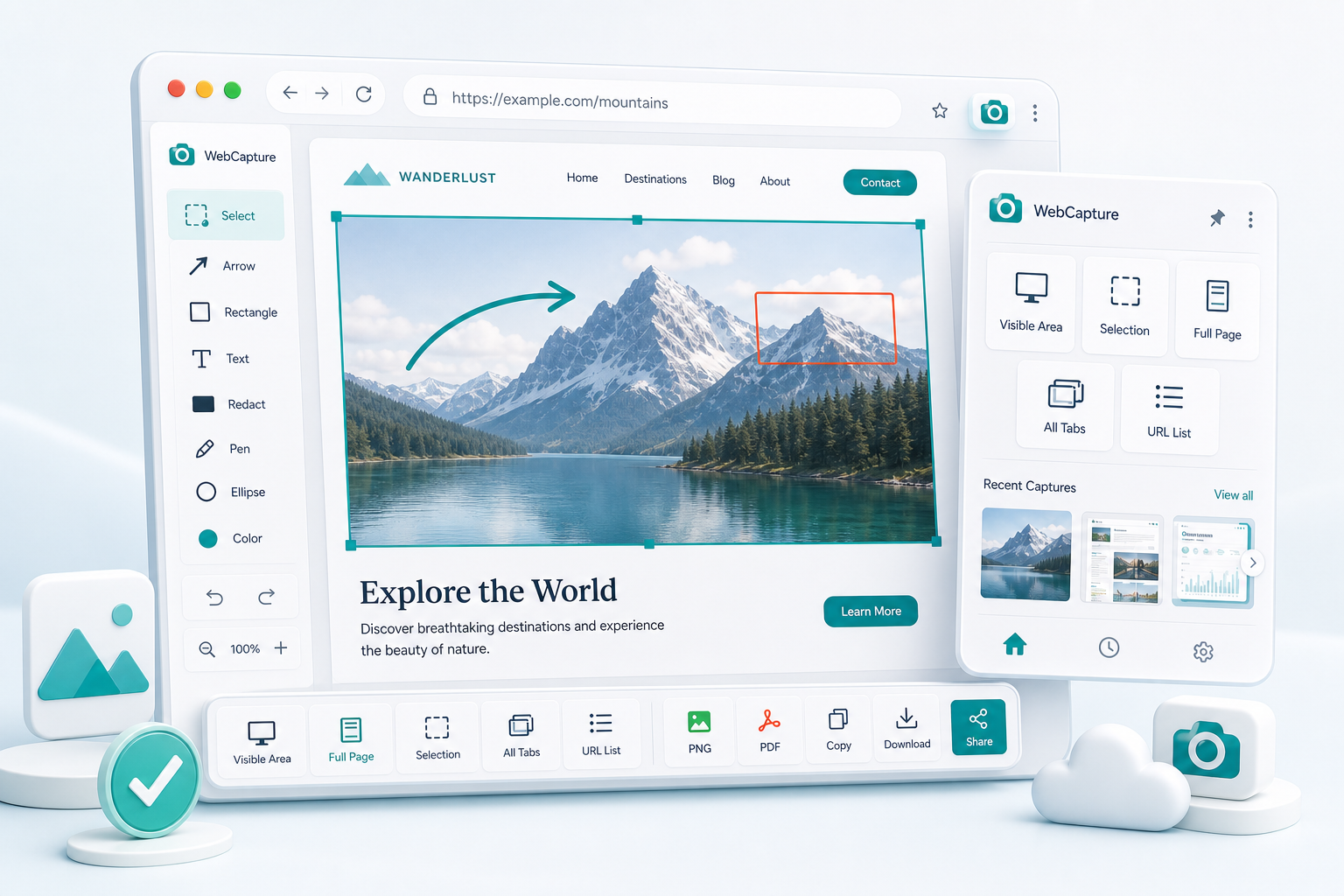
Visible, selection, full page, tabs, or URL lists.
Arrows, highlights, text, pen, shapes, and redaction.
PNG, JPEG, PDF, GIF, BMP, print, copy, and share.
Reopen recent captures and keep the workflow moving.
Everything you need
From a quick visible-area snapshot to all-tabs capture and URL-list queues — annotate, redact, export, and share from one browser workflow.
Visible area, custom selection, full scrollable page, every open tab at once, or a queued URL list — pick the right tool for every situation.
Rectangles, arrows, ellipses, freehand pen, and text labels. Highlight a bug, circle a UI element, or add step numbers — then save the annotated version back to your history.
Drag the redact tool over passwords, emails, API keys, or private data. Solid black fills are baked permanently into every export — nothing leaks through.
Download as PNG or JPEG on Free, with Pro access to PDF, GIF, and BMP. PDF export includes page size, margins, headers, footers, watermarks, and multi-page splitting for long captures.
Copy to clipboard or print on Free. Pro adds native share and drag-to-share from the preview editor.
Recent captures stay in local browser history for Free users. Pro plans can reopen older stored captures beyond the 7-day Free access window.
Built for every team
From solo developers to support teams — anyone who needs to communicate visually.
Capture all failing tabs in one shot. Export a formatted PDF bug report with headers and page numbers — ready to attach to any ticket.
Screenshot any error, black out personal data with redaction, then copy, download, or use your device's native share flow.
Capture competitor pages, annotate design feedback, and share visual comparisons instantly — without Figma, Loom, or Slack threads.
Queue URL lists, capture references, annotate key context, and keep everything organised in your capture history.
Simple workflow
Click the extension icon and choose your mode — visible area, selection, full-page scroll, all open tabs, or a custom URL list. WebCapture opens the right preview or queue state when the job is done.
Open the preview editor to mark up your capture with rectangles, arrows, and redaction. Pro adds ellipse, text, pen, and saved annotated versions.
Download as PNG or JPEG, copy to clipboard, or print. Pro adds PDF, GIF, BMP, native share, and drag-to-share.
Automatic Pro unlock
After payment, the extension on this browser unlocks automatically. Your WCP- license key is still emailed as a backup for another browser, recovery, or device management.
After payment, the success page unlocks Pro in the extension automatically. Your license email is also on the way.
Keep the license email for another browser, recovery, or device management. The screenshot uses the example key WCP-MONTHLY-ABC123-DEF456; real keys are unique per purchase.
On another browser, open the popup, choose Enter license key, paste the key, and press Activate. The screenshot shows only an example key.
If you cannot find the email, choose Send my key, enter your checkout email, and click Send to request a fresh email.
After activation, Pro capture actions unlock and the account panel changes to Licensed. Use Manage devices or Remove license when you need to move a key between browsers.
Simple, transparent pricing
Start a 7-day Pro trial inside the extension. No card, no automatic charge, and no hidden tiers.
Pro — Monthly
Full access for $5/month. Cancel anytime.
Cancel anytime. No questions asked.
Pro — Yearly
That’s $2.50/month, billed as $30/year.
$30 billed annually.
Pro — Lifetime License
Pay once. Use for life. No renewals, ever.
One payment. A lifetime of productivity.
Start the 7-day Pro trial in the extension, or keep using Free with 20 captures/day.
Built for repeat work
Capture every relevant tab, annotate defects, redact private data, and export a clean PDF without rebuilding the evidence by hand.
Queue a list of URLs, preserve full-page references, and keep older captures available when the work spans more than one week.
Turn captures into polished PDF deliverables with annotations, headers, footers, margins, and watermarks from one browser workflow.
Stop juggling Snagit, Loom, and file attachments. WebCapture does it all in Chrome, Edge, Coc Coc, and other Chromium-based browsers.
20 free captures/day • No credit card • Chrome & Edge ready